Install the native companion
brew install --HEAD nvk/tap/llm-wiki-chrome
llm-wiki-chrome install
Chrome starts the allowlisted Native Messaging host on demand. No daemon or background service is installed.
Public source · local execution · explicit tab grants
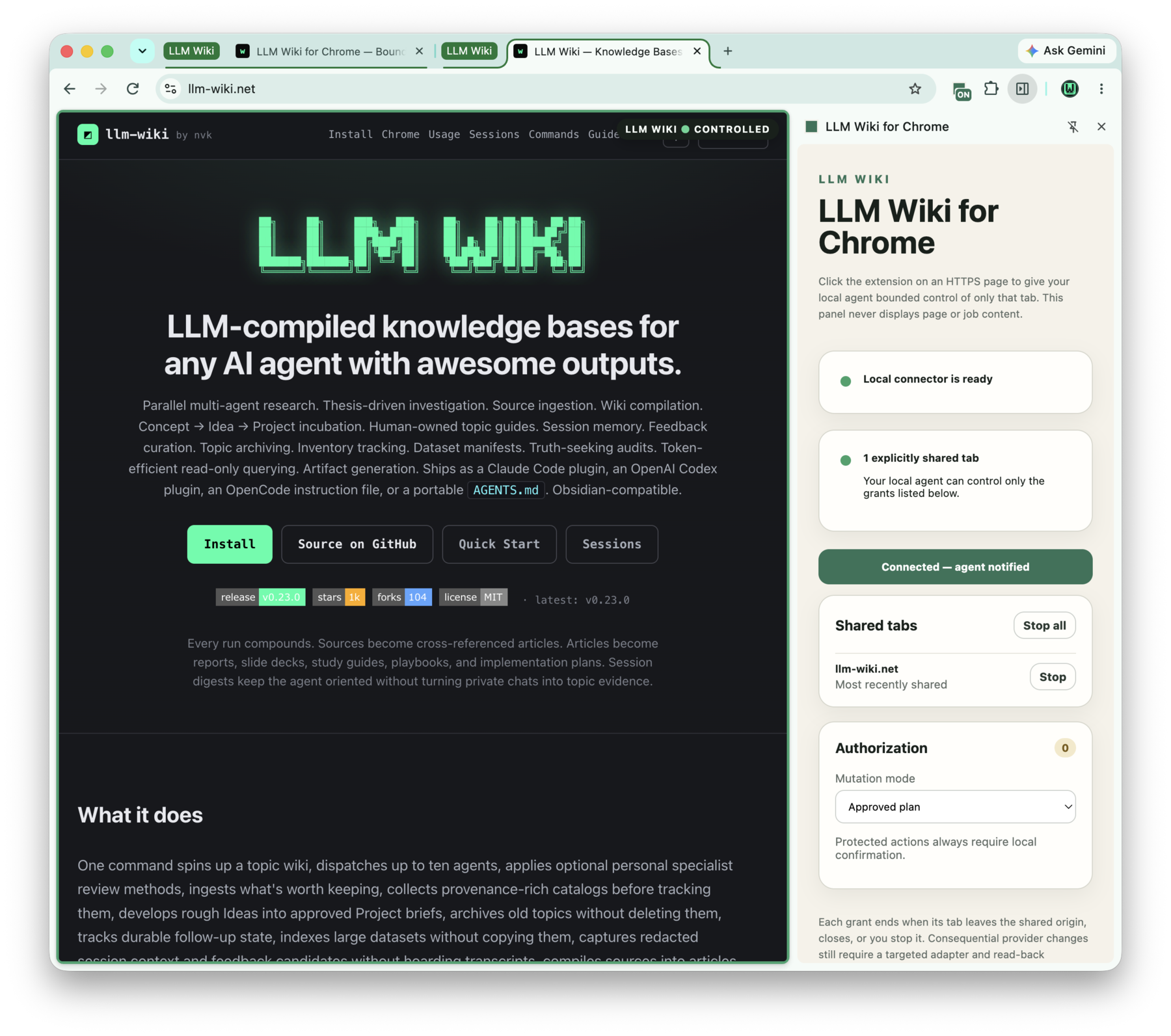
LLM Wiki for Chrome gives a local agent bounded control of tabs you explicitly share. Every grant is visible, tied to one exact tab and origin, and revocable from the side panel.
A shared tab gets a green outline, an LLM WIKI • CONTROLLED marker,
an ON toolbar badge, and a side-panel entry. The agent sees the grant
immediately through the local connector—no port, pairing code, or page OAuth flow.
Development installation
There is no stable package or Chrome Web Store listing yet. The current public build is
installed from the HEAD formula in nvk/tap and loaded unpacked.
brew install --HEAD nvk/tap/llm-wiki-chrome
llm-wiki-chrome installChrome starts the allowlisted Native Messaging host on demand. No daemon or background service is installed.
llm-wiki-chrome extension-pathCopy the printed path. It points at the exact extension bundled with the installed companion.
chrome://extensions.codex mcp add llm-wiki-browser -- \
llm-wiki-chrome mcp-serverStart a new Codex session after registration. Other MCP hosts can use the same stdio command: llm-wiki-chrome mcp-server.
llm-wiki-chrome doctorhealthy: true verifies the package and registration. connected: true appears while Chrome has the native port open.
Provider-specific llm-wiki adapters can call the same local client directly. They still own authentication, planning, revision locks, recovery, and independent verification.
Click to collaborate
Click the extension on additional tabs to build an explicit workspace of up to 16 grants. Unrelated tabs are never enumerated.
Protected actions still require local confirmation. Consequential provider workflows should use a targeted adapter with plan binding and read-back verification.
Bounded accessibility snapshots, element geometry, viewport/region/full-page screenshots, waits, and private diagnostics.
Semantic click, hover, type, select, drag, key, scroll, tab focus, and same-origin navigation through typed tools.
Uploads and downloads work only inside explicitly registered local roots, with path, completion, danger-state, and hash checks.
Green page outline, controlled-tab pill, toolbar badge, tab group, side-panel status, and content-free completion notices.
Exact collaboration ID, URL, origin, program hash, capability, limits, deadline, and focus are validated before execution.
Page data is returned only to the calling local agent for the active request. The extension panel and repository never store or display it.
Security boundary
<all_urls> or persistent host permissions.Public source does not make runtime data public. Tab grants, page content, credentials, private result slots, and Native Messaging sockets stay on the local machine. Review the security model before enabling consequential workflows.
Open the target HTTPS page and click the pinned toolbar icon. A side-panel button cannot manufacture Chrome's required user gesture.
Run llm-wiki-chrome install, reload the unpacked extension, then run llm-wiki-chrome doctor.
Confirm the side panel says Connected—agent notified. Restart the MCP client session if it was registered after the agent started.